
The "Open to Work" Mistake Hiding Profiles
Most executives load five title slots with step-ups only, and headhunters never see them.

Inside this issue:
The “high interest” classifier almost no senior executive knows LinkedIn runs against their profile
Why filling all five Open to Work slots with step-up roles makes you invisible in two searches at once
The 15-minute Sunday setup that beats six months of profile polishing
I see it every week.
A senior executive sends me their LinkedIn profile. The headline is clean. The About section is dense with keywords. The Experience section uses standardized titles. On paper, the profile is optimized.
They still do not show up in recruiter searches.
The reason sits underneath the profile, in a layer most executives never touch. Last quarter, I analyzed 1,750 executive profiles inside my search pipeline. The candidates who ranked at the top of LinkedIn Recruiter results were not only the ones with the densest keywords. They were the ones LinkedIn had quietly classified as having “high interest” in a specific kind of role.
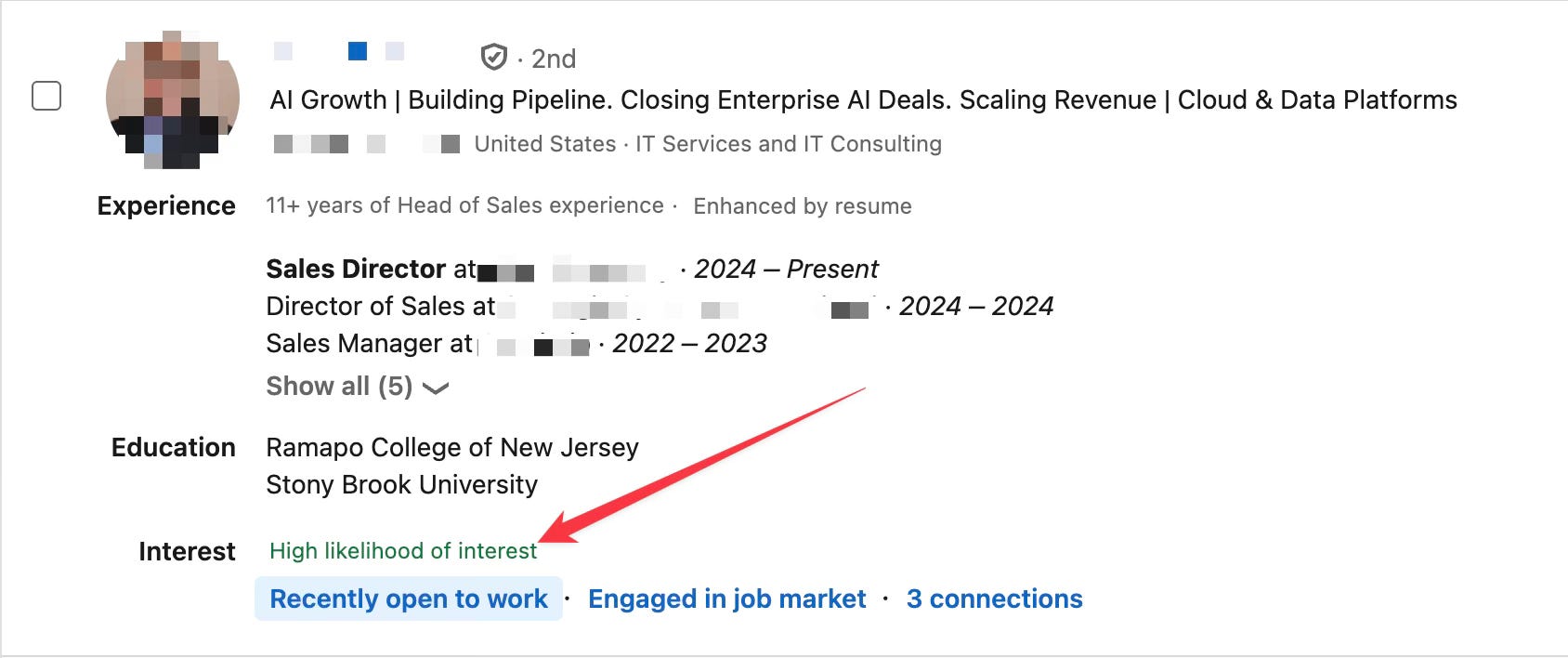
Keywords get you into the matched pool. Behavior decides your rank inside it.
What the 1,750-Profile Study Showed
Two signals drove that “high interest” classification more than anything else.
The first was the job titles each candidate had entered into the Open to Work configuration. Not the public banner. The private, recruiter-only version. The second was the searches each candidate ran on the LinkedIn job board itself.
Profile updates and recruiter message replies contributed too, but the two dominant inputs were Open to Work titles and job board search activity. Most executives configure neither.
They write a strong headline, polish the About section, and assume the work is done.
Wrong.
The platform sees a profile that has been edited once and abandoned. It has no behavioral signal of intent. It ranks accordingly.
A 25-Year Career, Invisible for Twelve Months
A former Country Manager came to me last autumn. 25 years in medtech. Board seats. P&L responsibility over €180M. Strong sector reputation across DACH.
He had been applying to listings for eleven months. Four interviews. Zero offers.
Profile strong. Network strong. Open to Work off. Search activity minimal. The system had no way to know he was available, and it mapped the executive market without him in it.
We changed two things. We rebuilt the Open to Work configuration following the system below. We started a daily 10-minute search routine on the LinkedIn job board.
The first inbound call from a retained search firm landed in week three. By week eight he had three live processes. He signed in week eleven at a €240k base plus 40% bonus.
Nothing in the profile content changed. The signals were finally feeding the system.
The 4-Step Open to Work Configuration
The setup takes 15 minutes. Most executives leave it half done.
Step 1: Set Visibility to Recruiters Only
Two visibility settings exist. The public green banner is the wrong one. It attracts opportunists and signals desperation to your current network.
The recruiter-only setting is what you want. LinkedIn Recruiter treats it as a strong positive ranking input. Headhunters see it. Your boss does not.
Step 2: Fill All Five Title Slots With the Right Mix
You get five job title slots. Use all five. Most executives use one or two.
But which titles you pick matters more than filling the count. Most executives who do fill all five slots load them with step-up roles only. A sitting Sales Director lists VP Sales, VP Commercial, CRO, SVP Sales, and Chief Revenue Officer.
Wrong move.
Here is why. When I run a VP Sales search, the pool of sitting VPs is usually small and over-fished. I expand the search down one level. I add Sales Director to the title filter. That expanded search is where I actually build the shortlist.
The Sales Director who loaded all five slots with VP titles does not show up in the VP search. He has never held the title. He also does not show up in the expanded Sales Director search. His Open to Work signals zero interest in director-level roles.
He vanishes from both. He thinks he is being aspirational. The system reads him as unavailable for the searches he is actually built for.
The formula: your current title, one or two synonyms for it, and one or two step-up titles. That gives you visibility in the searches you already qualify for and the searches you want to grow into.
Use standardized titles only. No “Growth Catalyst.” No “Transformation Architect.” Manager, Director, Vice President, Chief. That is the language inside LinkedIn Recruiter.
Step 3: Set Continent-Level Locations
Most executives type “EMEA” or “LATAM” into the location field in Open To Work and assume the platform translates it.
Wrong.
LinkedIn does not recognize those acronyms. They read as gibberish to the matching algorithm. The search returns nothing and your profile gets excluded from every regional pull.
Use continent-level on-site locations. Europe. United States. Asia. Broad geography means more matches, not fewer. Recruiters narrow from there.
Step 4: Configure Remote Geography Separately
If you are open to remote, the remote location field is separate from the on-site one. Set it just as broadly. Continent level minimum. Remote searches and on-site searches pull from different fields, so one filled and one empty cuts your match rate in half.
That covers the 15-minute Open to Work setup. The full profile rebuild, headline through skills, takes eight to twelve hours done properly against the Boolean searches headhunters actually run.
I do that work for senior executives, delivered as a copy-paste document.
The Daily 10-Minute Search Routine
The configuration is the static signal. The job board search is the live one.
LinkedIn watches every action you take on the platform. When you log in. What you browse. What you search for. Those behaviors feed the “high interest” classifier in real time. The platform decides who you are now, not who you were when you last updated your headline.
Spend ten minutes a day on the LinkedIn job board. Run searches with the exact titles, industries, and regions you want next. Save three or four of them. Click into the postings that interest you. Read the descriptions.
Do not apply. The activity itself is the signal.
Within two to three weeks the classifier shifts. Your profile starts surfacing in recruiter searches for those parameters, flagged as “actively interested” without ever sending an application.
Most stuck executives skip this entirely. They check LinkedIn once a week, drop a comment, and wait. The job board search is the missing input that turns a static profile into a ranked one.
The Real Bottleneck Most Executives Miss
If you have been out of role for six months and the inbound has gone quiet, the bottleneck is rarely the headline. It is rarely the About section. By the time you reach this stage, the profile content is usually fine.
The bottleneck is behavior. The system does not know you are available.
The fix: stop polishing what is already polished. Configure the two layers that actually drive ranking. The recruiter-only Open to Work with all five slots filled, and the daily search routine on the job board.
Your Action Step: This Saturday, spend 15 minutes inside the Open to Work settings. Recruiters Only. Five standardized title slots. Continent-level locations. Starting Monday, ten minutes a day on the LinkedIn job board running searches that match what you want next.
Run this for two weeks before changing anything else on your profile. If the inbound shifts, you have your answer. If not, the bottleneck is somewhere else.
Your next executive role is already being searched for. Make sure the system knows where to find you.
Till next time,
Kristof
PS. Founding members get a LinkedIn profile review from me, plus weekly office hours in the Substack chat.
These are great ideas. I am doing some of them but not. You have given me a job to do on Monday.
That is where a lot of strong candidates accidentally hurt themselves. They are broadcasting too many possible versions of themselves. “Open to product, strategy, ops, partnerships, chief of staff, maybe startups, maybe big tech” etc.
The fix is choosing a tighter search lane and making every signal support it: profile, target roles, saved searches, outreach, resume bullets, and interview stories. I shared my approach here: https://consulting2tech.substack.com/p/your-90-day-plan-to-land-a-tech-offer